Monthly
9.99 € / month
cancel anytime
- Live scoreboard for OBS Studio
- Practice games in your stream
- Zoom Tool, Auto-Clipper & Sounds
- Customizable overlay design
- Discord support
scoria.one gives you a live scoreboard, practice games in your stream, the cleanest and fastest-to-set-up zoom, auto clipper and sound alerts in one Chrome extension. Ready to go in minutes, runs on Windows, Mac and Linux.
Challenges
Your darts stream could look better. But the tools are making it hard.
Auto-scoring interfaces like Scolia are built for playing, not streaming. They take up too much room and distract from the action.
Overlay here, clipper there, sounds somewhere else. For every stream you need three different programs.
Installers, config files, OBS Studio scenes. By the time everything works, half the evening is gone.
Results
When everything comes from one place, you notice the difference immediately.
A compact darts scoreboard that doesn't cover the game and keeps the focus on your throws.
Clean, modern and easy to read. Like professional darts broadcasts on Twitch and YouTube.
Overlay, clipper, sounds, zoom. All in one place, all from one extension.
Toolkit
scoria.one has everything your darts stream needs. From live scoreboard to automatic clips.
Scores, legs and sets flow into the overlay automatically. No manual input, no scene switching.
Overlays for all Scolia practice games: Power Scoring, 121, Checkout Streak and JDC Challenge. Live in your stream, no extra setup.
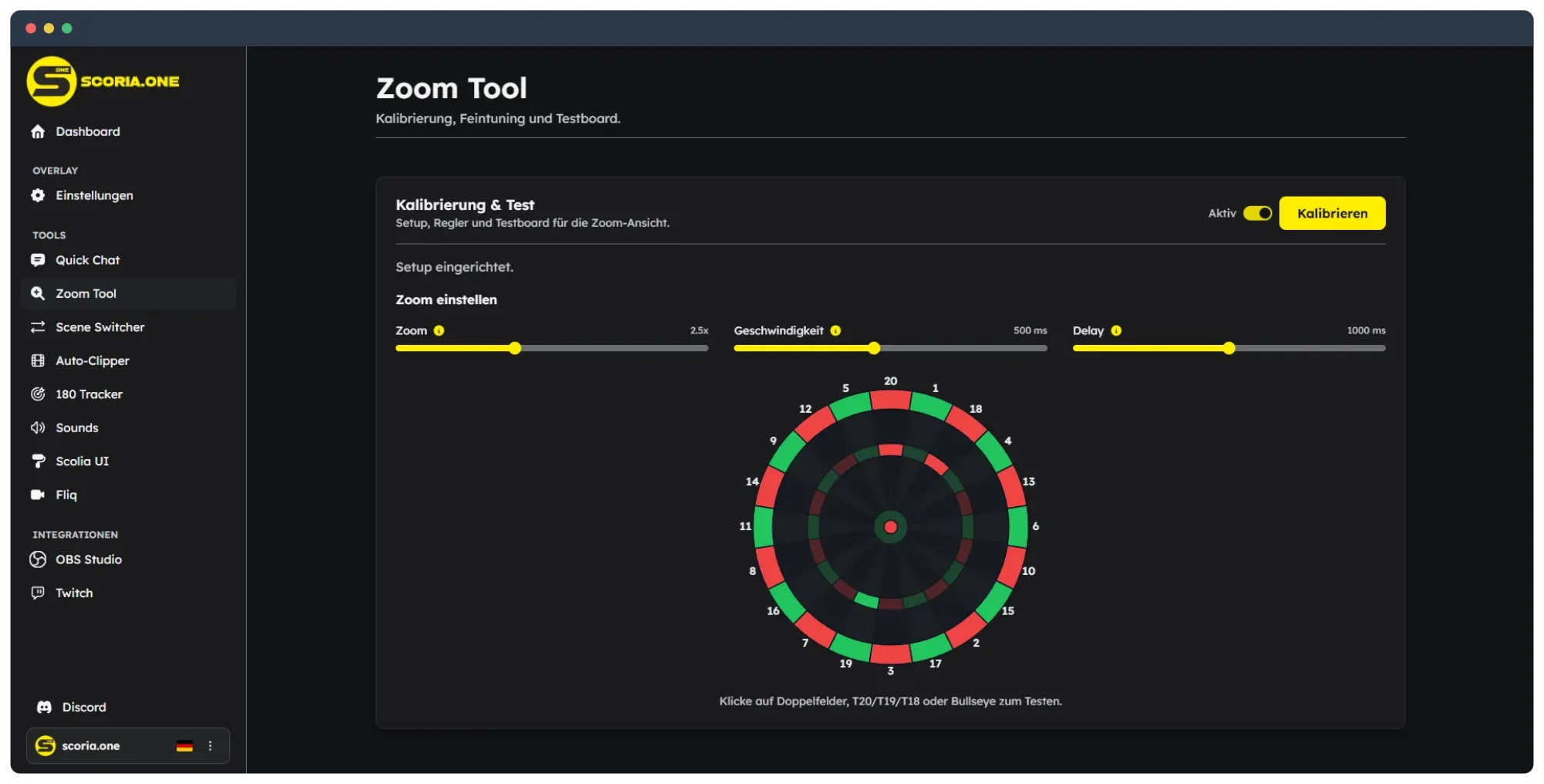
Automatically zooms to bull, T20 or doubles depending on the game situation. Pick your camera, set four points on the board, done.
Threw a 180? Clip created. Automatically via Twitch, without pressing anything.
On 180, 26 or match end, your stream reacts audibly to what happens on the board.
OBS Studio automatically switches scenes on match start or match end.
Send predefined messages to the Scolia chat without switching tabs.
Counts every 180 per day, month and year. Soon visible directly in your stream.
Customize colors and visibility of your scoreboard elements to match your stream.
Advantages
Built for darts streamers who don't want to waste time.
scoria.one is the only tool that shows all Scolia practice games live in your stream: Power Scoring, 121, Checkout Streak and JDC Challenge. Your viewers see everything in real time.
No download, no local server, no installer. Just a Chrome extension. You're live in two minutes, zero risk.
Other zoom solutions require dozens of manual OBS Studio filters and half an hour of configuration. With scoria.one you pick your camera, set four points on the board and you're done.
Windows, Mac or Linux, doesn't matter. All you need is a browser like Chrome or Edge and OBS Studio.
Updates happen automatically in the background. No manual downloads, no new versions to install. You just keep streaming.
scoria.one is a maintained product with active Discord support. Questions get answered, problems get solved.
Built for continuous use. Not a tool that stops being maintained one day. Stability and development are guaranteed.
Testimonials
Real feedback from darts streamers using scoria.one.
Three steps, then your darts stream has everything it needs. Full setup guide →
Choose your plan
Choose your plan, complete the payment and receive your key instantly via email.
Install the extension
Install the Chrome extension, enter your key and your darts streaming toolkit is ready to go.
Add to OBS Studio
Add the browser URL to OBS Studio, adjust the size, done. Everything runs automatically from here.
Demo
Overlay and zoom work together: every dart lands instantly in the overlay, and the zoom pulls in T20, doubles and bull right when it matters.
Your stream stays clean, your viewers stay in the action.
Pricing
Two plans, one goal: your stream with a professional overlay.
Flexible monthly or best value with the annual plan.
Monthly
9.99 € / month
cancel anytime
Annual
Best Choice99.90 € / year
2 months free
Secure payment via Stripe — you'll be redirected to checkout

Development & Operations
With scoria.one you get more than tools. You get a product that is continuously maintained and improved.
New features and improvements are added regularly so your stream stays up to date.
Feature requests and feedback from the community flow directly into the next updates.
When things change in the ecosystem, we adapt scoria.one so your toolkit keeps running reliably.
scoria.one is developed with a focus on stability, extensibility and the future.
FAQ
Answers to the most common questions about scoria.one
Just a Chromium browser (Chrome, Edge, Brave) and OBS Studio. No downloads, no installer. The Chrome extension is all you need.
Yes. You can connect to a friend's board and the scoreboard will show their game live in your stream.
Currently Scolia is supported. The extension reads the data automatically, no configuration needed. More systems are planned.
Yes. You can adjust colors, visibility of individual scoreboard elements and the Scolia UI color directly in the extension.
Your key gets deactivated and the overlay stops showing content. No further obligations.
scoria.one requires no installation and runs on any operating system. Plus exclusive features like overlays for all Scolia practice games and the auto-clipper. See our detailed comparison page.
All of them. scoria.one shows overlays for Power Scoring, 121, Checkout Streak and JDC Challenge — live in your stream, no extra setup.
Only streams with an active overlay URL show content. You decide if and with whom you share the URL.
Go live in minutes. With everything your darts stream needs.